iOS - 1.240.0
(23.04.2026)
Table of contents
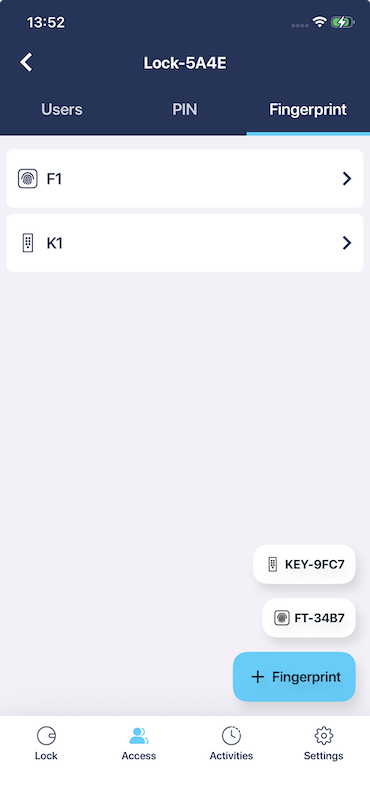
- Manage fingerprints from all accessories paired with the lock in one unified list, directly from the lock access tab.
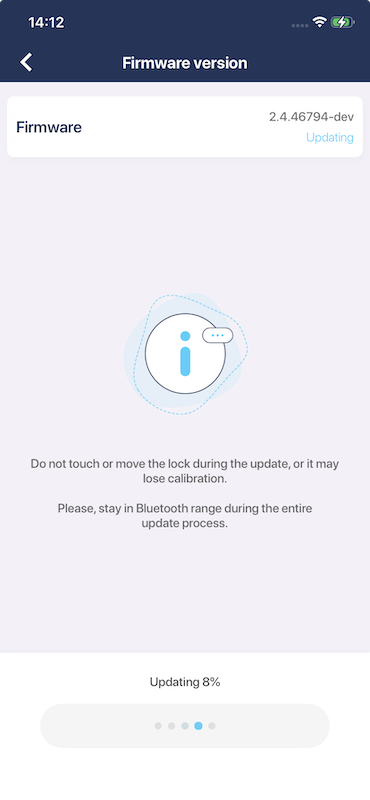
- Added an informational message during firmware update reminding users not to move the lock, as doing so may cause loss of calibration.
- Improved app responsiveness after launch — the device list is now immediately interactive, especially for users with many devices.
Manage fingerprints from all accessories paired with the lock in one unified list, directly from the lock access tab.
You can now manage fingerprints directly from the lock’s access tab — no need to navigate to individual accessory settings pages. All fingerprints from every fingerprint-capable accessory paired with your lock are presented in a single, unified list, making it easier to add, edit, and remove fingerprints in one place.
Added an informational message during firmware update reminding users not to move the lock, as doing so may cause loss of calibration.
The firmware update screen now displays an informational message reminding you not to move the lock while an update is in progress. Moving the lock during a firmware update can cause it to lose its calibration. This applies to all supported lock types.
Improved app responsiveness after launch — the device list is now immediately interactive, especially for users with many devices.
We fixed an issue where, for users with a large number of devices, items on the device list were unresponsive to taps for a few seconds after a cold start of the app. The device list is now immediately interactive as soon as the app opens.