iOS - 1.234.0
(02.12.2025)
Table of contents
Swipe to Unlock
This feature is now available to all users! You can unlock your device with a simple swipe directly from the My Device page, making access quicker and more intuitive.
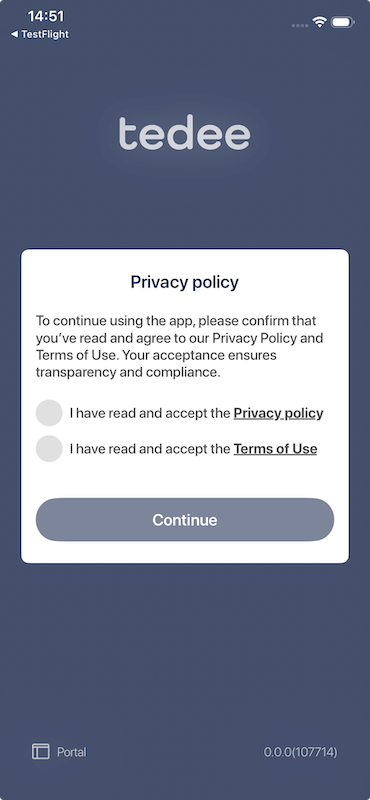
Privacy Policy Confirmation
On your first launch, before signing in or creating an account, you’ll see a confirmation popup. This ensures you’ve read and accepted our Privacy Policy and Terms of Use. The popup includes direct links to both documents so you can review them before accepting.
This popup will only appear for new installations. If you already have the app installed, you won’t see this prompt.
Improved Navigation
All links to the Privacy Policy and Terms of Use now open in your default browser instead of an in-app web view. This change provides a smoother and more familiar browsing experience.
Battery Level Display Fix
Previously, when a lock was disconnected, the app displayed the last known battery level. This issue has been resolved—now, no battery information will appear when the lock is disconnected.
Scrolling Improvements
We’ve fixed a problem that caused lists (such as long device lists and activity logs) to jump while scrolling. Navigation is now stable and much easier to use.
Red Dot Indicator Correction
The red dot that highlights new features will now behave correctly. It appears once for new features and disappears after you explore them, instead of reappearing every time the app restarts.