iOS - 1.231.0
(23.10.2025)
Table of contents
In Preview: Swipe to unlock the lock or gate from the My Devices page.
You can now swipe to unlock your door lock or gate directly from the My Devices page — a faster, more intuitive way to access your devices! 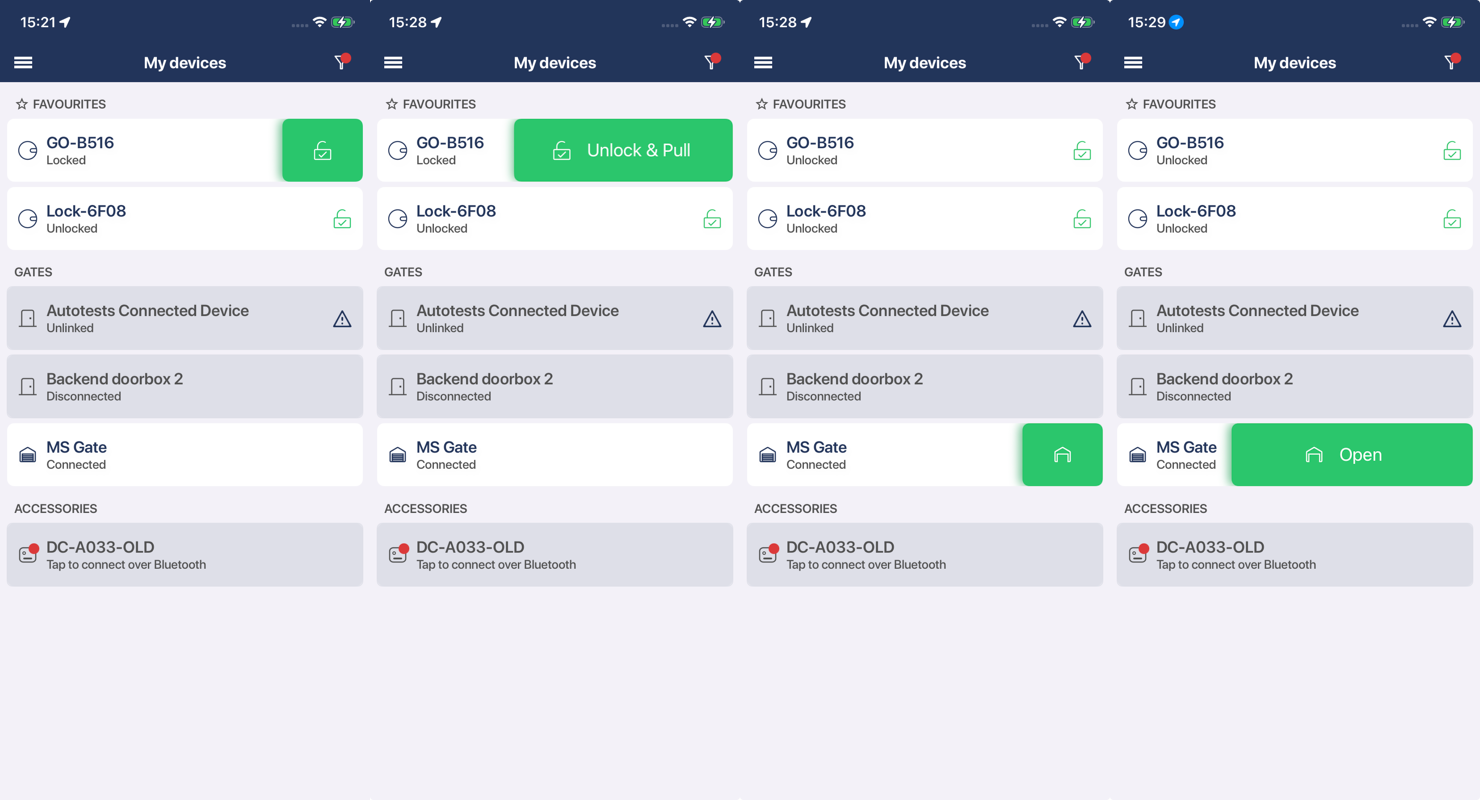
How it works:
- Just swipe left on your door lock or gate in the My Devices list to reveal the unlock option.
- For door locks, swipe to unlock is available when:
- The lock is closed or semi-locked
- Or the lock is unlocked and the Pull Spring feature is enabled and configured
- For gates, swipe to unlock is available as long as the gate isn’t already open
This feature is part of our Preview program and is enabled by default for preview testers.
To become a preview tester:
- Go to your Profile
- Enable the Preview Tester option
Stability improvements for Apple Watch
We’ve made some behind-the-scenes updates to improve the overall experience on Apple Watch. These changes aim to support smoother interactions and better reliability in day-to-day use.
Fixed an issue with receiving notifications after switching accounts
We’ve fixed an issue where notifications weren’t received after switching accounts. Previously, they would only resume after leaving the app and returning — this is no longer necessary.