iOS - 1.229.0
(23.09.2025)
Table of contents
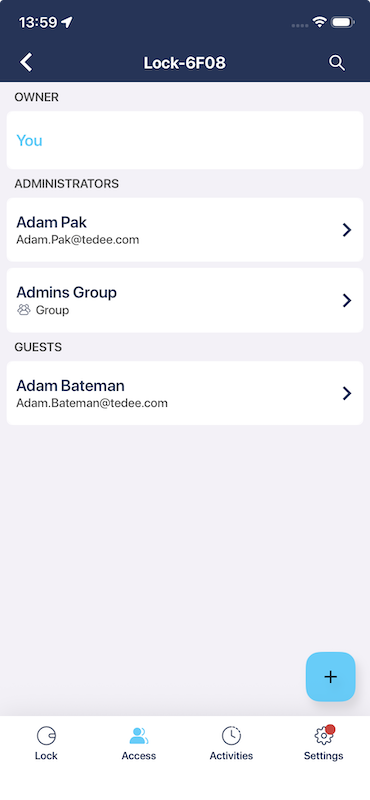
Display user groups in the device share list
The device share list now shows all groups that have been configured for a device. This allows you to easily see which groups have access, making it simpler to review and manage group-based sharing.
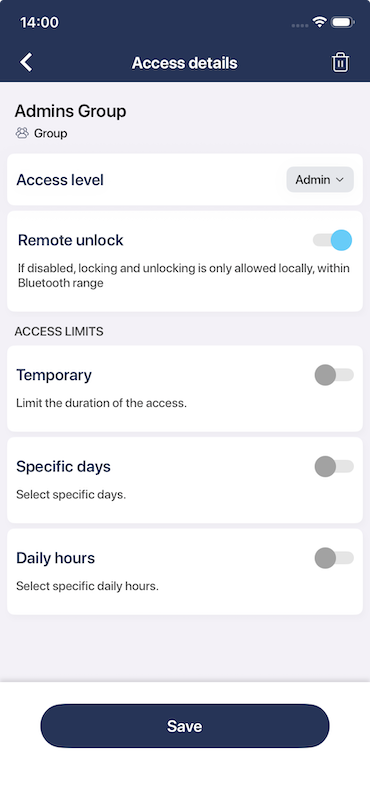
Show detailed access information for user groups
Tapping on a user group reveals detailed access information, including access restrictions and the assigned permissions level. This helps admins and users better understand group-level access at a glance.
Users with group access can view their own access details
Users who have access to devices through a group can now view their own access details. This transparency helps users understand what permissions they have and which groups grant them access.

Fixed an issue on some iPhones where enabling the torch caused the camera feed to freeze in the activation code scanner
We’ve resolved a bug affecting some iPhone models where turning on the torch (flashlight) during activation code scanning would cause the camera feed to freeze. Scanning activation codes with the torch enabled now works smoothly.